Website Redesign Checklist for Kenyan SMEs
A practical checklist for Kenyan SMEs that need to redesign a website without breaking search visibility, enquiry journeys, analytics or customer trust.
Website Redesign Checklist for Kenyan SMEs
A website redesign can improve credibility, usability and lead generation. It can also erase years of search visibility, break enquiry forms and remove the tracking that tells you whether marketing is working.
For a Kenyan SME, that risk has a direct commercial cost. A redesigned site may look cleaner while important service URLs return 404 errors, WhatsApp buttons stop passing context, forms send nothing, mobile visitors struggle to act and Google Analytics records fewer conversions simply because tags were not restored.
The safest redesign is not a visual project with SEO added at the end. It is a controlled migration of business assets: pages, rankings, links, enquiries, analytics, consent controls and sales journeys.
This checklist helps a business owner, marketer and developer agree on what must be preserved, improved and tested before the new website goes live.
Quick answer
Before redesigning an SME website, inventory every valuable URL, enquiry path, tracking tag, downloadable asset and integration. Keep high-value URLs where possible. If a URL must change, map it to the closest equivalent page and implement a direct permanent redirect. Build the new site in a protected staging environment, test it on mobile, verify forms and analytics with real submissions, crawl it for broken links, then monitor Search Console and leads after launch.
Do not approve a redesign based only on appearance. Approve it when the website preserves search equity, makes the offer easier to understand and proves that a potential customer can complete the intended action.
Key takeaways
- Set commercial goals before discussing colours, layouts or platforms.
- Preserve valuable URLs and content unless evidence supports a change.
- Create a one-to-one redirect map before launch, not after rankings fall.
- Protect analytics, conversion events, forms, CRM handoffs and WhatsApp journeys.
- Test the full customer path on real phones and common network conditions.
- Treat privacy, security, accessibility and backups as launch requirements.
- Compare qualified enquiries and sales outcomes, not screenshots or page views alone.
- Keep the old website and a complete crawl available until the new site is stable.
Table of contents
- Decide whether you need a redesign
- Set goals and baselines
- Inventory the current website
- Protect SEO and URLs
- Plan content and conversion journeys
- Design for mobile usability and trust
- Preserve analytics and lead tracking
- Check privacy, security and accessibility
- Test before launch
- Launch and monitor
- Website redesign checklist
- Common redesign mistakes
- Frequently asked questions
- Summary and next step
1. Decide whether you need a redesign
Not every weak website needs to be rebuilt.
Sometimes the real problem is a vague offer, missing service pages, slow lead follow-up or broken measurement. A new theme will not repair those issues by itself. It may simply place the same commercial weakness inside a newer layout.
A redesign is usually justified when several structural problems exist together:
- the website no longer reflects the business, services or target customer;
- visitors cannot understand the offer or next step quickly;
- mobile navigation and forms are difficult to use;
- staff cannot update essential content safely;
- the site architecture creates duplicate, thin or orphaned pages;
- technology or plugins are unsupported and create security risk;
- page templates cannot support the content and conversion journeys the business needs;
- branding, accessibility or trust requirements need a system-wide change;
- analytics and integrations are so fragmented that controlled rebuilding is safer than repeated patches.
If the problem is limited to speed, content or one lead form, targeted improvement may be faster and less risky. Review Tabala’s guide to building a faster website for Nairobi customers before assuming the whole site must be replaced.
Redesign, refresh or rebuild?
Choose the smallest intervention that solves the business problem.
2. Set goals and baselines before design starts
The redesign brief should explain what must improve in measurable business terms.
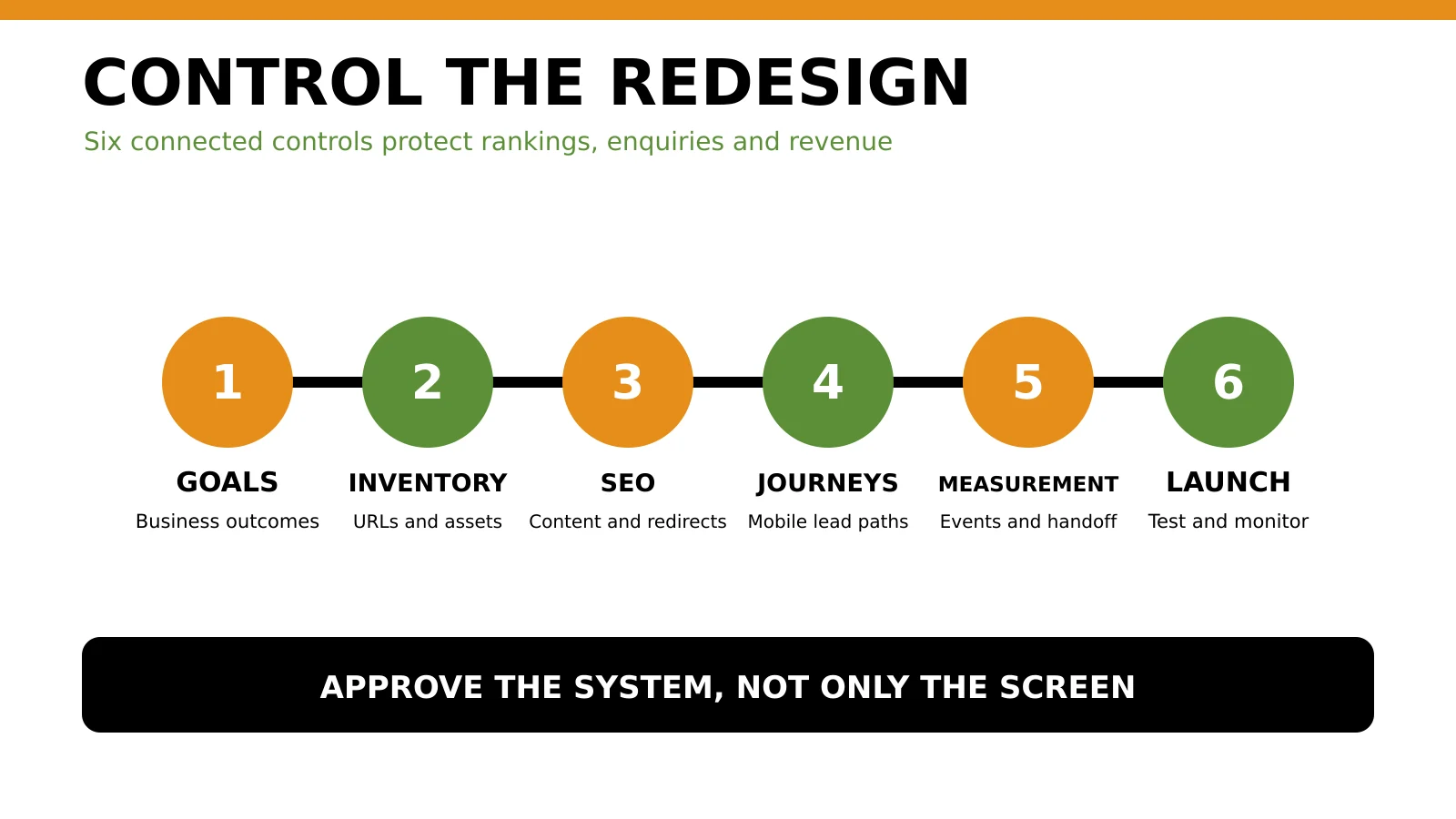
A redesign should be governed as one connected commercial system.
Useful goals include:
- increase qualified quote requests for a priority service;
- reduce failed or incomplete form submissions;
- help mobile visitors reach WhatsApp, call or booking actions faster;
- improve organic visibility for defined service categories and locations;
- make it easier for staff to publish accurate service and case-study content;
- improve lead-source attribution and sales follow-up;
- remove obsolete pages without creating broken links;
- support expansion from Nairobi into Mombasa, Kisumu, Nakuru, Eldoret or East Africa where the business genuinely operates.
Avoid goals such as “make it modern” or “improve SEO” without a definition of success.
Record the baseline
Before development begins, export or record:
- top landing pages from Google Search Console;
- queries, clicks, impressions, click-through rate and average position;
- organic, paid, referral and direct sessions in GA4;
- verified lead events and their source or campaign;
- submitted enquiries, qualified leads, quotations and closed sales;
- current page speed and Core Web Vitals reports;
- indexed pages, sitemap URLs and crawl errors;
- backlinks and frequently linked pages;
- current forms, phone links, WhatsApp links, booking tools and downloads.
The baseline does not promise that a redesign will improve every metric. It lets the team distinguish genuine improvement from measurement loss.
If you cannot currently connect traffic to enquiries, run the 360 Digital Growth Diagnostic before finalizing the redesign scope.
3. Inventory the current website before deleting anything
Create a content and functionality inventory. A spreadsheet is sufficient if it records each URL and its role.
For every current page, record:
- URL and page title;
- content purpose and primary search intent;
- service, product or location supported;
- clicks, impressions and useful conversions where available;
- backlinks or important internal links;
- proposed action: keep, improve, merge, redirect or remove;
- proposed destination if the URL changes;
- owner and approval status.
Also inventory non-page assets:
- PDFs, catalogues, menus, price lists and lead magnets;
- image URLs that attract search traffic or external links;
- videos and embedded tools;
- forms and thank-you pages;
- CRM, email, payment, booking and WhatsApp integrations;
- analytics, advertising and consent tags;
- schema markup and social-sharing metadata;
- robots.txt, XML sitemaps and verification files.
Do not use the navigation menu as the inventory. Important pages may be absent from the menu but still receive traffic, links or enquiries.
4. Protect SEO, URLs and search equity
The safest URL is often the one that already works.
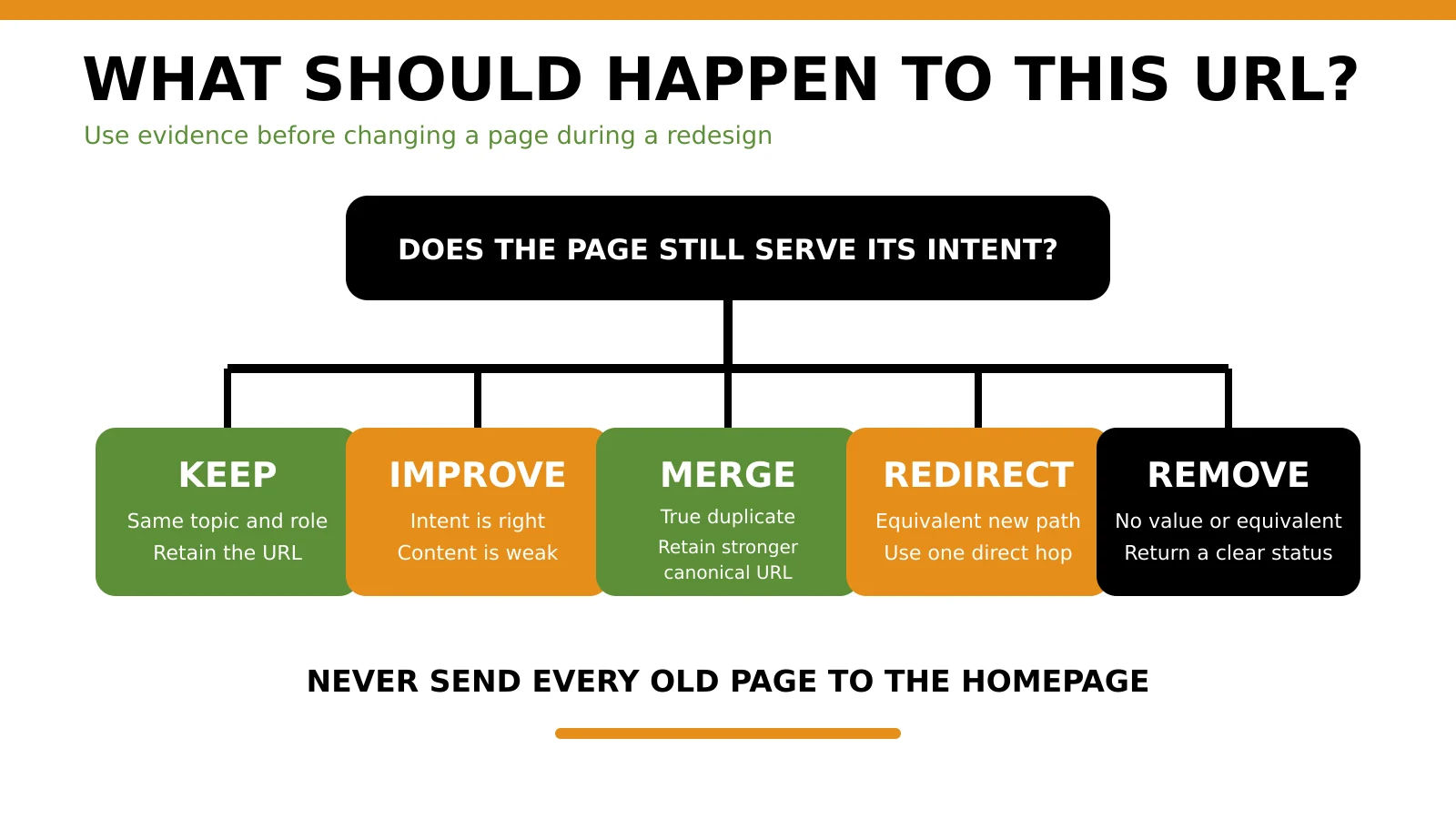
Make each URL decision from evidence and intent, not appearance.
Do not rename pages merely to make slugs look cleaner. A shorter URL is not automatically worth the migration risk. Keep an established URL when the topic, intent and business role remain substantially the same.
When a URL must change
Create an explicit old-to-new map. Each retired URL should point directly to the most equivalent live page.
Google’s site-move guidance recommends mapping old URLs, updating internal links and using permanent server-side redirects when locations change. Google also recommends directing a URL to its final destination rather than building redirect chains.
Use a 301 or 308 redirect when the move is intended to be permanent. Do not redirect every removed page to the homepage. A visitor who requests a specific service guide should reach an equivalent service or guide, not a generic page.
Follow the technical SEO checklist for Kenyan websites to verify canonicals, indexability, sitemap coverage and crawl access. Use the on-page SEO checklist to preserve titles, headings, intent and internal links during content migration.
Protect the staging site
The staging website should not compete with the live site. Restrict public access and confirm that search engines cannot index staging URLs. Before launch, remove the protection from the production site and verify that important pages do not retain accidental noindex directives.
Take a complete pre-launch crawl and keep it. After launch, a second crawl makes missing pages, changed canonicals, broken links and unexpected status codes easier to find.
5. Plan content and conversion journeys
A redesign should make the buying journey clearer, not simply reorganize the menu.
For every priority audience, define:
- What problem brings the visitor to the site?
- Which page should answer that problem?
- What proof reduces doubt?
- What action should the visitor take?
- What happens after the action?
- How will the business know whether the lead was qualified?
A Nairobi law firm, Mombasa logistics company and Kisumu clinic may all need different proof, language and enquiry routes. Local references should reflect real operations, not keyword decoration.
Protect high-intent pages
Service pages need more than a paragraph and a contact button. A strong service page normally explains:
- the customer problem;
- who the service is for;
- scope and exclusions;
- process;
- proof and relevant experience;
- location or service coverage;
- expected next step;
- answers to buying questions;
- a clear CTA.
If paid media will use the redesigned site, preserve message match between ads and destinations. Tabala’s Google Ads landing-page guide explains when a focused landing page is more useful than sending every visitor to the homepage.
Map forms and follow-up
List every form field, validation rule, recipient, autoresponder, storage location and sales owner. Decide which fields are essential for qualification and which create unnecessary friction.
Test the post-submit experience. A success message is not enough. The enquiry should be stored, delivered and assigned, and the customer should know what happens next.
6. Design for mobile usability, speed and trust
Many redesign reviews happen on a large monitor. Many customers will experience the result on a phone.
Google’s mobile-first indexing guidance explains why important content and structured data should be available on mobile as well as desktop. The redesign should not hide useful content simply to create a cleaner small-screen layout.
Test:
- navigation with one hand;
- readable text without zooming;
- buttons with enough separation;
- forms using the correct mobile input types;
- tap-to-call and WhatsApp actions;
- keyboard behaviour and error messages;
- sticky elements that do not cover content;
- images that preserve meaning without slowing the page;
- layouts at 390 pixels and other common widths;
- performance on ordinary mobile connections, not only office Wi-Fi.
Review the mobile SEO and conversion guide when defining the mobile acceptance criteria.
Build trust deliberately
Trust signals should help a visitor verify the business and the offer. Use real evidence:
- legal business name and consistent contact details;
- physical location or genuine service-area information;
- clear team or leadership information where appropriate;
- specific testimonials with permission;
- case studies that explain context and work performed;
- transparent process, pricing approach or quotation steps;
- relevant licences, memberships or certifications that can be verified;
- privacy, terms, returns or service policies appropriate to the business;
- secure HTTPS and accurate browser warnings;
- current content and working contact channels.
Do not manufacture review counts, partner logos, awards or client results. A redesign should increase credibility, not create decorative proof that cannot be verified.
7. Preserve analytics, advertising and lead tracking
Measurement often breaks because tags are copied late or installed only on the homepage.
Before launch, record the current IDs and configuration for:
- Google Tag Manager containers;
- GA4 properties and web streams;
- Google Ads conversion actions and enhanced conversion settings where used;
- Meta Pixel or other advertising tags;
- consent-management platform;
- call tracking;
- CRM and form integrations;
- UTM handling and cross-domain measurement;
- internal traffic and developer filters;
- Search Console verification.
Do not fire lead events merely because someone clicked a button. Fire the event when the intended action actually completes.
Google lists generate_lead as a recommended GA4 event when a visitor submits a form or request for information. For longer sales cycles, the recommended lead events also support later stages such as qualification and conversion. Use event names and parameters consistently, then validate them in testing.
Build a test matrix
For each conversion path, record:
Retain screenshots or logs for the acceptance record, without storing customer personal data in an insecure project folder.
8. Check privacy, security and accessibility
A redesigned site may collect names, phone numbers, email addresses, enquiry details, payment information or analytics identifiers. The Kenya Data Protection Act provides the legal framework for handling personal data. The exact obligations depend on the business, processing and risk, so legal or data-protection advice may be appropriate for higher-risk cases.
At minimum, confirm:
- forms collect only information the business needs;
- privacy information is accurate and accessible;
- consent choices match the technologies actually used;
- personal data is sent and stored securely;
- access is limited to appropriate staff;
- backups are protected and restorable;
- third-party services are documented;
- retention and deletion processes are understood;
- production credentials are not shared in project documents.
Security checks should cover supported software, least-privilege accounts, strong authentication, HTTPS, backups, update responsibility, spam controls and monitoring.
Accessibility checks should include keyboard navigation, focus visibility, form labels, error messages, colour contrast, descriptive link text, image alternatives and heading order. These improvements help more people use the site and often make the interface clearer for everyone.
9. Test before launch
Do not treat testing as the final afternoon before launch.
Content and SEO testing
- Every approved page exists and contains the final content.
- Titles, meta descriptions and headings match the page intent.
- Canonicals point to the intended production URLs.
- Important pages are indexable.
- Staging URLs are not referenced.
- Internal links use final URLs.
- Redirects return the intended status and destination.
- XML sitemaps contain canonical, indexable URLs.
- Structured data reflects visible content.
- Image filenames and alternative text are useful.
Functional testing
- Forms submit valid data and reject invalid data clearly.
- Email notifications arrive.
- Leads are stored even if email delivery fails.
- CRM, booking, payments, maps and WhatsApp integrations work.
- Search, filters and downloads work where present.
- Error pages help the visitor recover.
- User roles cannot access unauthorized areas.
Device and browser testing
Test current versions of common browsers and real mobile devices where possible. Check common screen widths, portrait and landscape orientation, touch behaviour, slow connections and interrupted submissions.
Performance testing
Core Web Vitals are not the only measure of a useful site, but they provide standardized signals for loading, responsiveness and visual stability. The official Web Vitals guidance explains the metrics and their role across Google tools.
Test representative templates, not only the homepage. A fast homepage does not compensate for slow service, product or article pages.
10. Launch in a controlled sequence
Schedule the launch when the business, developer and marketing owner can monitor it. Avoid launching immediately before a major campaign or when the responsible team will be unavailable.
Launch sequence
- Create verified backups of the site, database, media and configurations.
- Freeze last-minute content changes or document them carefully.
- Deploy the approved production build.
- Remove staging-only restrictions from the production site.
- Activate and test redirect rules.
- Confirm analytics, consent and conversion tags.
- Run a fresh crawl and compare it with the old-site inventory.
- Submit or refresh the XML sitemap in Search Console.
- Test the highest-value enquiries from start to finish.
- Monitor server errors, 404s, indexation, traffic and lead flow.
If the domain changes, follow Google’s site-move instructions and use the appropriate Search Console process. A domain migration and full redesign at the same time can increase diagnostic complexity. Separate major changes where practical.
11. Website redesign checklist for SMEs
Strategy and scope
- The business problem and redesign objective are documented.
- Success metrics include qualified leads or sales outcomes.
- Redesign, refresh and rebuild options were compared.
- Priority audiences, services and locations are agreed.
- Decision owners and approval stages are clear.
Content and SEO
- All current URLs are inventoried.
- Pages are classified as keep, improve, merge, redirect or remove.
- High-value pages and backlinks are protected.
- Old-to-new redirect mapping is approved.
- Titles, headings, canonicals and internal links are migrated.
- Robots, noindex rules and XML sitemaps are checked.
- The production site contains no staging URLs.
Conversion and measurement
- Primary CTA is defined for each important page.
- Forms, WhatsApp, calls, bookings and payments are tested.
- Enquiries are stored and delivered reliably.
- GA4, Tag Manager and advertising tags are restored.
- Recommended lead events fire only after successful actions.
- UTM parameters and attribution survive the journey.
- Qualified-lead and sales follow-up ownership is clear.
Experience and trust
- Mobile navigation, content and forms are usable.
- Content remains equivalent across mobile and desktop.
- Contact details and service coverage are accurate.
- Testimonials, licences and claims are verifiable.
- Privacy and policy pages match current processing.
- Keyboard, contrast, labels and focus states are checked.
Technical and launch
- Supported software and secure accounts are in place.
- Backups have been created and a restore path exists.
- Representative templates pass performance testing.
- Redirects, status codes and error pages are verified.
- A pre-launch and post-launch crawl are retained.
- Search Console, server errors and lead flow will be monitored.
- A rollback decision and owner are documented.
12. Common redesign mistakes
Starting with the homepage mock-up
The homepage is one part of the customer journey. Start with audiences, offers, architecture and conversion paths, then design the templates that support them.
Deleting old content without evidence
An old-looking page may still rank, attract links or help customers. Evaluate performance and intent before merging or removing it.
Changing every URL
Clean-looking slugs do not justify unnecessary risk. Preserve established URLs where the content role remains the same.
Sending all retired pages to the homepage
This frustrates users and removes context. Redirect only to genuinely equivalent destinations.
Counting button clicks as leads
A click on WhatsApp, a phone number or a form button does not prove a conversation or successful submission. Separate interaction events from completed lead events.
Launching without sales-team testing
Marketing may confirm that the form submits while sales discovers that notifications lack essential information. Test the operational handoff, not only the interface.
Treating mobile as a smaller desktop
Mobile users face different input, connection and attention constraints. Test actual journeys on actual phones.
Replacing the site without a rollback plan
Keep a recoverable backup and clear decision criteria. A launch issue is easier to manage when the team knows who can roll back and what evidence triggers that decision.
13. Frequently asked questions
How much does a website redesign cost in Kenya?
Cost depends on page count, content work, custom design, CMS development, integrations, ecommerce, migration risk, testing and measurement. Ask for a scope that separates strategy, design, development, content migration, SEO preservation, tracking and post-launch support. A single price without scope is difficult to compare.
How long should an SME website redesign take?
A small brochure website may take several weeks, while a content-heavy, multilingual, ecommerce or integration-heavy website can take longer. Timeline should be based on approved scope, content readiness, review cycles and testing, not a generic promise.
Will a redesign hurt SEO?
It can if valuable content, URLs, internal links, metadata, indexation controls or performance are damaged. A controlled redesign can preserve or improve the foundations, but temporary fluctuations are possible, especially when URLs, domain or content change substantially.
Should we change our domain during a redesign?
Only when there is a strong business reason. A domain move adds migration work and search risk. If it is necessary, verify both properties, map URLs carefully, use direct permanent redirects and follow Google’s site-move process.
Do we need to keep every old page?
No. Keep or improve pages that serve users, rankings, links or business journeys. Consolidate true duplicates. Remove pages with no ongoing value only after checking whether an equivalent destination or explanatory response is appropriate.
What should we track after launch?
Track crawl errors, indexation, sitemap status, organic clicks and impressions, landing-page traffic, verified lead events, qualified enquiries, sales outcomes, form failures and user feedback. Compare against the pre-launch baseline.
Should SEO start after the design is approved?
No. Search intent, content requirements, architecture, internal links, URL decisions and migration controls affect design and development. SEO review should begin during planning.
How do we choose a website redesign partner?
Ask how the partner protects URLs, content, measurement and lead flow. Request a clear discovery process, deliverables, acceptance tests, responsibilities, launch plan and post-launch support. Review Tabala’s website development services in Nairobi if you need strategy, build and measurement handled as one commercial system.
14. Summary and next step
A successful website redesign protects what already creates value and fixes what blocks growth.
Before launch, you should be able to answer four questions with evidence:
- Can customers find the right page?
- Can they understand the offer and trust the business?
- Can they complete the next step on mobile?
- Can the team prove what happened after the action?
If any answer is uncertain, the redesign is not ready for approval.
Run the 360 Digital Growth Diagnostic to identify whether the priority is website structure, search visibility, paid-media alignment, measurement or sales follow-up. If the existing platform needs rebuilding, discuss a controlled project through Tabala’s website development service.
| Option | Best when | Typical scope | Main risk |
|---|---|---|---|
| Visual refresh | Structure and journeys work, but the brand looks dated | typography, colour, imagery and component styling | spending money without improving conversions |
| Conversion refresh | Traffic exists, but visitors do not enquire or buy | messaging, proof, CTA hierarchy, forms and landing pages | optimizing the wrong action because tracking is weak |
| Technical rebuild | Platform, templates or integrations block progress | CMS, code, performance, security and reusable templates | losing URLs, content or data during migration |
| Full redesign | Brand, content, architecture, technology and journeys all need change | strategy through launch and measurement | changing too many variables without a controlled baseline |
| Old page situation | Correct action | Avoid |
|---|---|---|
| Same topic and intent, improved content | retain the URL and update in place | publishing a competing new URL |
| Two weak pages answer the same intent | consolidate the useful content and redirect one to the retained page | keeping both pages to target the same keyword |
| Page moves to an equivalent new path | direct permanent redirect to the equivalent page | redirect chain or JavaScript-only redirect |
| Service discontinued with no equivalent | explain the change or return an appropriate status | misleading redirect to an unrelated service |
| Temporary campaign page removed | assess links and traffic before removal | assuming temporary means valueless |
| Journey | Test action | Evidence required |
|---|---|---|
| Quote form | submit a valid test enquiry | database record, email delivery, CRM entry and GA4 event |
| Phone | tap the number on mobile | correct number opens and tracking behaves as intended |
| tap from service page | correct destination and useful prefilled context | |
| Booking | select and confirm a slot | confirmation, calendar record and event |
| Purchase | complete a controlled order | order record, value, currency and transaction ID |
| Download | submit or access the asset | asset works and lead or engagement event is appropriate |
Accelerate Your Revenue
While Revenue Intelligence builds long-term authority, Google Ads delivers immediate, high-intent traffic. Combine both for maximum market dominance.

Strategist Profile
Abala Tom
Digital systems strategist specializing in high-performance SEO, Google Ads, and conversion optimization. Mission: to replace marketing 'guesswork' with predictable revenue systems.